<?xml version="1.0" encoding="utf-8"?>
<feed xmlns="http://www.w3.org/2005/Atom">
    <id>https://moduops.com/blog</id>
    <title>ModuOps Blog</title>
    <updated>2024-07-09T00:00:00.000Z</updated>
    <generator>https://github.com/jpmonette/feed</generator>
    <link rel="alternate" href="https://moduops.com/blog"/>
    <subtitle>ModuOps Blog</subtitle>
    <icon>https://moduops.com/img/favicon.ico</icon>
    <entry>
        <title type="html"><![CDATA[Introducing switch lists]]></title>
        <id>https://moduops.com/blog/switch_list</id>
        <link href="https://moduops.com/blog/switch_list"/>
        <updated>2024-07-09T00:00:00.000Z</updated>
        <summary type="html"><![CDATA[Version 5.5.0 of ModuOps introduces switch lists to the application. Switch lists are essential documents used by crews during switching operations. The ModuOps switch list is based on prototypical forms and follows the ModuOps philosophy of encouraging operations on temporary layouts. Switch lists are also perfect for static setups like home or club layouts.]]></summary>
        <content type="html"><![CDATA[<p>Version 5.5.0 of ModuOps introduces switch lists to the application. Switch lists are essential documents used by crews during switching operations. The ModuOps switch list is based on prototypical forms and follows the ModuOps philosophy of encouraging operations on temporary layouts. Switch lists are also perfect for static setups like home or club layouts.</p>
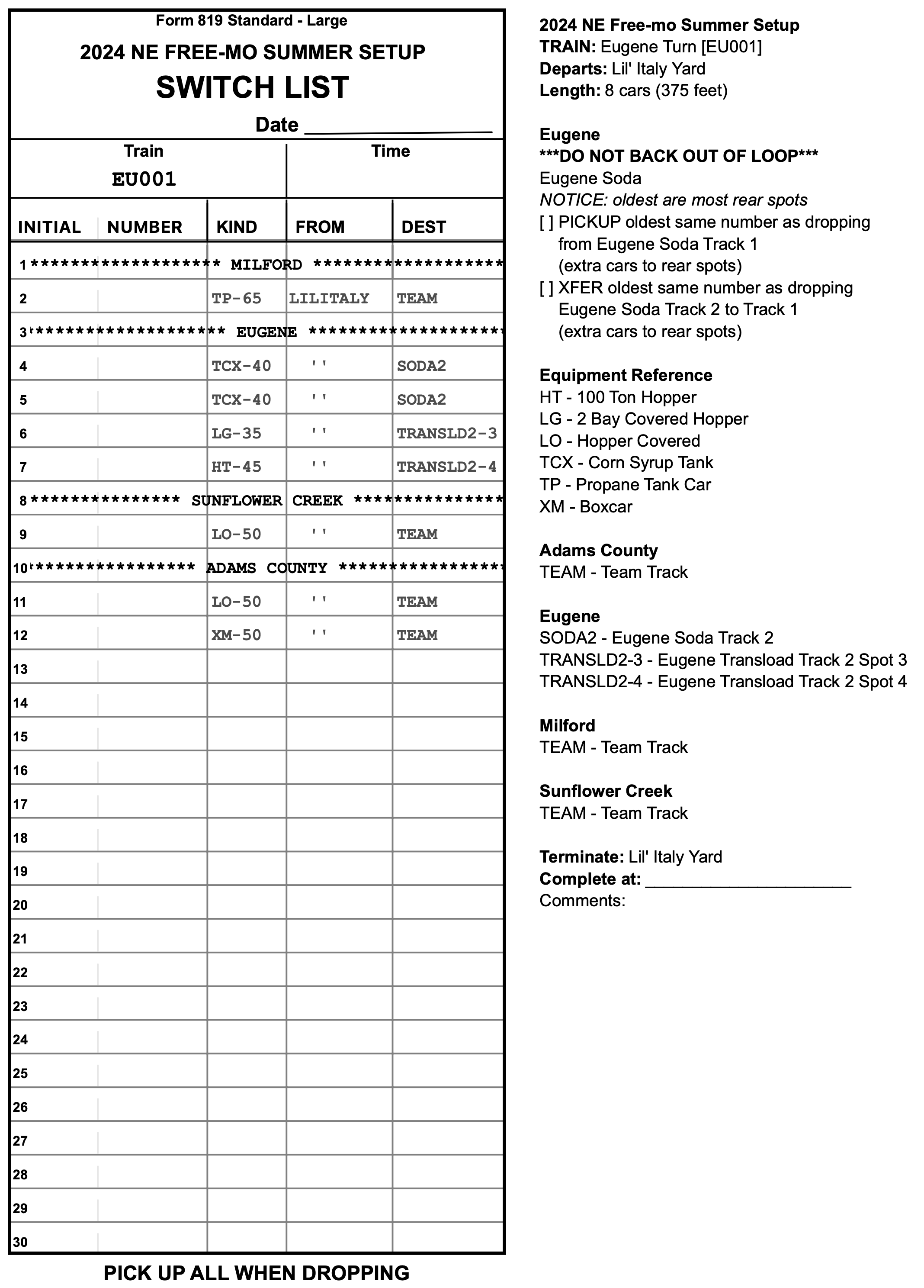
<p><img decoding="async" loading="lazy" alt="switch list" src="https://moduops.com/assets/images/switchlist-full-page-8564f0e862b0d8ed5271cb281ec7bfdb.svg" width="2136" height="2976" class="img_Bm_H"></p>
<p>Gaining access to the switch list output format is from the trainlist screen. Switch lists are added to the output format menu as an option. Once selected, click the <code>Generate Trainlist</code> button. A thumbnail of the generated switch is displayed. Click the <code>Print</code> button to print the switch list.</p>
<h2 class="anchor anchorWithStickyNavbar_KvU_" id="required-fields">Required fields<a href="https://moduops.com/blog/switch_list#required-fields" class="hash-link" aria-label="Direct link to Required fields" title="Direct link to Required fields">​</a></h2>
<p>ModuOps switch lists use 2 fields that typically have not been used in the past. Both of these fields must have data in them or the switch list will not display any information for the items when printed.</p>
<h3 class="anchor anchorWithStickyNavbar_KvU_" id="equipment-aar-code">Equipment AAR code<a href="https://moduops.com/blog/switch_list#equipment-aar-code" class="hash-link" aria-label="Direct link to Equipment AAR code" title="Direct link to Equipment AAR code">​</a></h3>
<p>On the equipment screen, be sure that all equipment has a value for the <code>AAR code</code> field. This is the field that is displayed on the switch list when printing.</p>
<p>If you are not sure how to determine the AAR code for a piece of equipment, the Opsig group has a handy reference for AAR codes that you can see by <a href="https://www.opsig.org/files/resources/AARFreightCarCodes.pdf" target="_blank" rel="noopener noreferrer">clicking here</a>.</p>
<div class="theme-admonition theme-admonition-caution admonition_D2Jv alert alert--warning"><div class="admonitionHeading_N0Zo"><span class="admonitionIcon_gmwq"><svg viewBox="0 0 16 16"><path fill-rule="evenodd" d="M8.893 1.5c-.183-.31-.52-.5-.887-.5s-.703.19-.886.5L.138 13.499a.98.98 0 0 0 0 1.001c.193.31.53.501.886.501h13.964c.367 0 .704-.19.877-.5a1.03 1.03 0 0 0 .01-1.002L8.893 1.5zm.133 11.497H6.987v-2.003h2.039v2.003zm0-3.004H6.987V5.987h2.039v4.006z"></path></svg></span>caution</div><div class="admonitionContent_U9Sd"><p>If the AAR code field is empty, the switch lists won't show car kind information when printed.</p></div></div>
<h3 class="anchor anchorWithStickyNavbar_KvU_" id="drop-zone-reference">Drop zone reference<a href="https://moduops.com/blog/switch_list#drop-zone-reference" class="hash-link" aria-label="Direct link to Drop zone reference" title="Direct link to Drop zone reference">​</a></h3>
<p>On the drop zone screen, be sure that all drop zones have a value in the <code>Zone reference</code> field. This field is displayed on the switch list when printing.</p>
<div class="theme-admonition theme-admonition-caution admonition_D2Jv alert alert--warning"><div class="admonitionHeading_N0Zo"><span class="admonitionIcon_gmwq"><svg viewBox="0 0 16 16"><path fill-rule="evenodd" d="M8.893 1.5c-.183-.31-.52-.5-.887-.5s-.703.19-.886.5L.138 13.499a.98.98 0 0 0 0 1.001c.193.31.53.501.886.501h13.964c.367 0 .704-.19.877-.5a1.03 1.03 0 0 0 .01-1.002L8.893 1.5zm.133 11.497H6.987v-2.003h2.039v2.003zm0-3.004H6.987V5.987h2.039v4.006z"></path></svg></span>caution</div><div class="admonitionContent_U9Sd"><p>If the drop zone reference field is empty, switch lists won't show destinations when printed.</p></div></div>
<h2 class="anchor anchorWithStickyNavbar_KvU_" id="switch-list-form-details">Switch list form details<a href="https://moduops.com/blog/switch_list#switch-list-form-details" class="hash-link" aria-label="Direct link to Switch list form details" title="Direct link to Switch list form details">​</a></h2>
<p>A switch list is printed in 2 columns. The first column is the ModuOps switch list form. The second column contains information about the work the crew will perform. The printed sheet is intended to be folded in half lengthwise.</p>
<h3 class="anchor anchorWithStickyNavbar_KvU_" id="switch-list-header">Switch list header<a href="https://moduops.com/blog/switch_list#switch-list-header" class="hash-link" aria-label="Direct link to Switch list header" title="Direct link to Switch list header">​</a></h3>
<p>The switch list header displays the layout name. This is the name field on the Layout screen.</p>
<p>The header has a blank space to enter the date of the train's operation. Below this the train symbol is added to the switch list along with a space to write the time the train starts the job.</p>
<h3 class="anchor anchorWithStickyNavbar_KvU_" id="switch-list-fields">Switch list fields<a href="https://moduops.com/blog/switch_list#switch-list-fields" class="hash-link" aria-label="Direct link to Switch list fields" title="Direct link to Switch list fields">​</a></h3>
<p>Each row of a switch list contains fields needed for the crew to perform the job. When a new module/town is on the train's route, the module/town name is displayed in the middle of the row. All the entries below this are intended for the module/town specified.</p>
<p>When a car is to be switched, the yard crew will have written in the reporting marks in the first column. The reporting marks should be entered such that the road name initials is entered in the left section of the column with the equipment number entered in the right of the column.</p>
<p><img decoding="async" loading="lazy" alt="reporting marks" src="https://moduops.com/assets/images/reporting_marks-d5c48271eba085fa2dff39f3fdcff6c2.svg" width="1172" height="104" class="img_Bm_H"></p>
<p>The column labeled <code>Kind</code> details the equipment needed. The equipment is specified as the AAR code followed by the length (ie. XM-50 for a 50' Box car).</p>
<p>The <code>From</code> column indicates where the equipment originates from. Currently this will only be the originating yard of the train. The Switchlist indicates a repeated previous value in this column with the text <code>''</code> indicating that the previous value remains unchanged.</p>
<p>The <code>Dest</code> column indicates the drop zone the equipment is to be set out at.</p>
<h3 class="anchor anchorWithStickyNavbar_KvU_" id="crew-instructions-and-reference">Crew instructions and reference<a href="https://moduops.com/blog/switch_list#crew-instructions-and-reference" class="hash-link" aria-label="Direct link to Crew instructions and reference" title="Direct link to Crew instructions and reference">​</a></h3>
<p>The 2nd column of the switch list provides crew with information about the work they need to perform. The header details the train information including the name and symbol as well as the number of cars and length.</p>
<p>Any special crew instructions are added to assist the crew in performing their job. This is information taken from the train's crew instructions as well as remarks for the module/towns and consignees they are working.</p>
<p>A handy reference is provided for the equipment on the train. This is a cross reference of the AAR Code to the equipment's description.</p>
<p>Crew will also find a reference for the drop zones they will be working to assist in setting out equipment to the correct zone.</p>
<h3 class="anchor anchorWithStickyNavbar_KvU_" id="crew-convenience">Crew convenience<a href="https://moduops.com/blog/switch_list#crew-convenience" class="hash-link" aria-label="Direct link to Crew convenience" title="Direct link to Crew convenience">​</a></h3>
<p>To make it easier to carry a switch list around a layout, fold the switch list in half vertically. We find that the narrow sheet of paper is easier to manage when operating a train than having a full sheet.</p>
<h2 class="anchor anchorWithStickyNavbar_KvU_" id="switch-list-faq">Switch list FAQ<a href="https://moduops.com/blog/switch_list#switch-list-faq" class="hash-link" aria-label="Direct link to Switch list FAQ" title="Direct link to Switch list FAQ">​</a></h2>
<h3 class="anchor anchorWithStickyNavbar_KvU_" id="when-i-print-a-switch-list-there-are-no-equipment-or-drop-zones-listed">When I print a switch list there are no equipment or drop zones listed<a href="https://moduops.com/blog/switch_list#when-i-print-a-switch-list-there-are-no-equipment-or-drop-zones-listed" class="hash-link" aria-label="Direct link to When I print a switch list there are no equipment or drop zones listed" title="Direct link to When I print a switch list there are no equipment or drop zones listed">​</a></h3>
<p>Switch list uses 2 fields that previously have not been used. If a switch list prints and there is no information displayed then you must enter in the required data for the switch list to render properly.</p>
<p>If the Kind column is blank, return to the Equipment edit screen and add AAR codes to equipment.</p>
<p>If the From or Dest column is blank, return to the Drop Zone edit screen and enter a drop zone abbreviation in the Zone reference field.</p>
<h3 class="anchor anchorWithStickyNavbar_KvU_" id="where-can-i-find-aar-codes">Where can I find AAR codes?<a href="https://moduops.com/blog/switch_list#where-can-i-find-aar-codes" class="hash-link" aria-label="Direct link to Where can I find AAR codes?" title="Direct link to Where can I find AAR codes?">​</a></h3>
<p>The Opsig group has a handy reference for AAR codes. You can find the reference by <a href="https://www.opsig.org/files/resources/AARFreightCarCodes.pdf" target="_blank" rel="noopener noreferrer">clicking here</a></p>
<p>Another option that we find works quite well is to use an online AI tool such as <a href="https://chatgpt.com/" target="_blank" rel="noopener noreferrer">ChatGPT</a> or <a href="https://www.bing.com/chat?q=Microsoft+Copilot&amp;FORM=hpcodx" target="_blank" rel="noopener noreferrer">Microsoft Bing Copilot</a>. Simply type in something to the effect of "I have a model railroad that I need AAR codes for operations. What is the AAR code for an insulated box car?"</p>
<h3 class="anchor anchorWithStickyNavbar_KvU_" id="is-it-possible-to-print-more-than-1-page-of-a-switch-list">Is it possible to print more than 1 page of a switch list?<a href="https://moduops.com/blog/switch_list#is-it-possible-to-print-more-than-1-page-of-a-switch-list" class="hash-link" aria-label="Direct link to Is it possible to print more than 1 page of a switch list?" title="Direct link to Is it possible to print more than 1 page of a switch list?">​</a></h3>
<p>Currently switch lists will print only 1 page. You will need to modify either the length of the train or limit the number of modules/towns a train services until the work fits on a single page.</p>]]></content>
        <author>
            <name>Bob Hall</name>
            <uri>https://github.com/bhall2001</uri>
        </author>
        <category label="ModuOps" term="ModuOps"/>
        <category label="Switch Lists" term="Switch Lists"/>
    </entry>
    <entry>
        <title type="html"><![CDATA[Version 5.5.0]]></title>
        <id>https://moduops.com/blog/v5_5_0</id>
        <link href="https://moduops.com/blog/v5_5_0"/>
        <updated>2024-07-08T00:00:00.000Z</updated>
        <summary type="html"><![CDATA[Version 5.5.0 is ready to roll! Introducing switch lists!]]></summary>
        <content type="html"><![CDATA[<p>Version 5.5.0 is ready to roll! Introducing switch lists!</p>
<p>Printing a switch list as an option on the trainlist screen. The switch list format is ModuOps spin on a prototypical switch list that leverages key information within ModuOps to assist operators.</p>
<p>A switch list details car type and where a car is moving from and to. Yard crew enter reporting marks on the switch list when the train is assembled in the yard.</p>
<p>The switch list displays information for the crew including remarks for the modules/towns and consignees they are working. The switch list also provides a handy reference of AAR codes and drop zone references to assist while working the switch list.</p>]]></content>
        <author>
            <name>Bob Hall</name>
            <uri>https://github.com/bhall2001</uri>
        </author>
        <category label="ModuOps" term="ModuOps"/>
        <category label="Release Notes" term="Release Notes"/>
    </entry>
    <entry>
        <title type="html"><![CDATA[Version 5.4.0]]></title>
        <id>https://moduops.com/blog/v5_4_0</id>
        <link href="https://moduops.com/blog/v5_4_0"/>
        <updated>2024-02-18T00:00:00.000Z</updated>
        <summary type="html"><![CDATA[Version 5.4.0 is now released. This is a minor update with a ton of changes.]]></summary>
        <content type="html"><![CDATA[<p>Version 5.4.0 is now released. This is a minor update with a ton of changes.</p>
<p>There is a new Layout screen, the Modules/Towns screen is redesigned, ability to easily add and save modules/towns, bug fixes and ui fixes. Check out the release notes for details.</p>
<p><a href="https://moduops.com/docs/releaseNotes">Release Notes</a></p>
<p>Along with this release I've also spent a lot of time updating the online documentation. Finally the docs are at a point where they are a useful resource. There are still some things that I would like to add but overall we now have something that I hope can be used to answer many questions.</p>
<p>Read the new <a href="https://moduops.com/docs">ModuOps Documentation</a>!</p>
<p>And one more thing...</p>
<p>ModuOps is a bit cumbersome when it comes to setting up new modular layouts. Most of us kept a large reference file with all possible modules already in the file. This posed a problem because it was impossible to tell what equipment was needed for a layout and when setting up routes on trains, having every module as a selection made it difficult to find and remember only the modules needed for a layout.</p>
<p>ModuOps version 5.4.0 addresses this with the addition of an Add button on the modules/towns screen. Modules can easily be added to a layout. Now you can have only the modules you need in a layout file.</p>
<p>But we are missing one last piece to the puzzle. A central place to go to where you can find the latest version of modules to include in a layout you need to setup. Sure you could keep all the layout files on your local hard drive. But you'll miss out on any updates made and will not have any of the new modules created since your last setup.</p>
<p>I'd like to introduce the ModuOps Xchange, an online global storage repository of modules. The Xchange is intended to be the resource where you can turn to find any module you need for a layout, hopefully any where in the world. A lofty goal but I hope we can make this happen.</p>
<p>The Xchange is a resource that I hope makes setting up new layouts a breeze. Now Ops Chiefs can simply add modules needed for a layout from the ModuOps Xchange. With only the modules needed for a layout in the file, you can easily see the equipment needed as well as easily create train routes selecting from only the modules that will be in the layout.</p>
<p>Right now the ModuOps Xchange is a shared Google Drive. You can mount the share to your Google Drive and have access to the all the modules in the Xchange. If you'd like to add/update modules in the Xchange, save each module on the Modules/Towns screen and email the module files to me. I'll get the modules added into the Xchange ASAP.</p>
<p>For details on how to add the ModuOps Xchange to your Google Drive, see the docs on the <a href="https://moduops.com/docs/xchange">ModuOps Xchange</a>!</p>
<p>Wow! Like I said, the biggest minor update EVER in the history of ModuOps!</p>]]></content>
        <author>
            <name>Bob Hall</name>
            <uri>https://github.com/bhall2001</uri>
        </author>
        <category label="ModuOps" term="ModuOps"/>
        <category label="Release Notes" term="Release Notes"/>
    </entry>
    <entry>
        <title type="html"><![CDATA[ModuOps Xchange]]></title>
        <id>https://moduops.com/blog/moduops-xchange</id>
        <link href="https://moduops.com/blog/moduops-xchange"/>
        <updated>2024-02-17T00:00:00.000Z</updated>
        <summary type="html"><![CDATA[a central repository for ModuOps modules used in model railroad operations]]></summary>
        <content type="html"><![CDATA[<p>ModuOps simplifies operations on modular layouts, making it an invaluable tool for those creating operating plans. However, finding the necessary modules for a specific layout has proven challenging. To address this, I've developed the ModuOps Xchange – a central repository for modules, easily accessible on the Internet, and organized for efficient navigation.</p>
<h2 class="anchor anchorWithStickyNavbar_KvU_" id="worldwide-module-repository">Worldwide Module Repository<a href="https://moduops.com/blog/moduops-xchange#worldwide-module-repository" class="hash-link" aria-label="Direct link to Worldwide Module Repository" title="Direct link to Worldwide Module Repository">​</a></h2>
<p>The Xchange adheres to international conventions for locating geographical regions worldwide. My vision is to create a global community where ModuOps users can seamlessly share their modules.</p>
<p>As an Ops Chief, you can effortlessly integrate modules from the Xchange into your layouts.</p>
<h2 class="anchor anchorWithStickyNavbar_KvU_" id="easy-access">Easy Access<a href="https://moduops.com/blog/moduops-xchange#easy-access" class="hash-link" aria-label="Direct link to Easy Access" title="Direct link to Easy Access">​</a></h2>
<p>The Xchange significantly reduces the administrative overhead required to set up a modular layout. By mounting the Module Xchange to your desktop file system, accessing modules becomes effortless. Adding a module to a layout is now as simple as incorporating it from the local file system into ModuOps.</p>
<p>Get more information on the ModuOps Xchange in the <a href="https://moduops.com/docs/xchange">ModuOps documentation</a>.</p>]]></content>
        <author>
            <name>Bob Hall</name>
            <uri>https://github.com/bhall2001</uri>
        </author>
        <category label="feature" term="feature"/>
    </entry>
    <entry>
        <title type="html"><![CDATA[Version 5.1.1]]></title>
        <id>https://moduops.com/blog/v5_1_1</id>
        <link href="https://moduops.com/blog/v5_1_1"/>
        <updated>2022-12-01T00:00:00.000Z</updated>
        <summary type="html"><![CDATA[Finally. The long awaited re-write of ModuOps is here!]]></summary>
        <content type="html"><![CDATA[<p>Finally. The long awaited re-write of ModuOps is here!</p>
<h2 class="anchor anchorWithStickyNavbar_KvU_" id="new-data-layer">New data layer<a href="https://moduops.com/blog/v5_1_1#new-data-layer" class="hash-link" aria-label="Direct link to New data layer" title="Direct link to New data layer">​</a></h2>
<p>The User Interface looks the same as it has in the past. The under-pinnings of the app have been completely renovated. A brand new data layer is slid in on top of a sqlLite database. As a result you will see that opening a data file is significantly faster. When you use the app now everything you do is read/written directly to the database.</p>
<p>The notion of "saving" your data file has gone away. As you use the app, your data is updated as you go along. This takes a bit to get used to for sure.</p>
<h2 class="anchor anchorWithStickyNavbar_KvU_" id="new-file-format">NEW FILE FORMAT<a href="https://moduops.com/blog/v5_1_1#new-file-format" class="hash-link" aria-label="Direct link to NEW FILE FORMAT" title="Direct link to NEW FILE FORMAT">​</a></h2>
<p>The data file is now the actual database for the app. Which unfortunately means that old data files are not compatible with the new version. There was no way to make the file formats compatible and for that I am sorry.</p>
<p>Not to worry. Files created with older versions of ModoOps (v2017+) can be converted to the new file format. The process is as easy as I could think of.</p>
<ul>
<li>select "Convert..." in the file menu</li>
<li>step 1 will have you create a a new blank file in the new format, give the file a name and save it in a location where you'll be able to find it again</li>
<li>step 2 is to locate your old .mop file on your hard drive and select it</li>
<li>Viola! The old data is converted to the new format and is ready to use in the new version of ModuOps</li>
</ul>
<p>If you have any issues converting your data file PLEASE REACH OUT TO ME. Email me the data file that you are having issues with and I'll see if I am able to convert it for you.</p>
<h2 class="anchor anchorWithStickyNavbar_KvU_" id="trainlist-screen-updates">Trainlist screen updates<a href="https://moduops.com/blog/v5_1_1#trainlist-screen-updates" class="hash-link" aria-label="Direct link to Trainlist screen updates" title="Direct link to Trainlist screen updates">​</a></h2>
<h3 class="anchor anchorWithStickyNavbar_KvU_" id="renaming-schedule-engines">Renaming schedule engines<a href="https://moduops.com/blog/v5_1_1#renaming-schedule-engines" class="hash-link" aria-label="Direct link to Renaming schedule engines" title="Direct link to Renaming schedule engines">​</a></h3>
<p>I decided to update the Trainlist screen a bit as well. As the app has gained more wide-spread use the scheduling engine naming is confusing. Very few of us know what it means to schedule like the Mad River and Big Timber software did.</p>
<p>You will see the Trainlist screen calls out the options for what they are, "Random" and "Use Cars/Week". The random option is just that, completely random based on the equipment needs all having a factor of 1 -- ie. all equipment needs are weighted as 1 unit. If a train has 10 potential requests, each item has a 10% chance of being selected no matter what the cars per week value is. Of course that changes if drop zones are full and cars can not be scheduled to a specific drop zone.</p>
<p>The "Use Cars/Week" option looks at the cars per week (CPW) defined for each equipment request resulting in a weighted random selection. This has the effect of statistically higher rates of selection for equipment needs with higher CPW values.</p>
<h3 class="anchor anchorWithStickyNavbar_KvU_" id="drop-zone-favoring">Drop zone favoring<a href="https://moduops.com/blog/v5_1_1#drop-zone-favoring" class="hash-link" aria-label="Direct link to Drop zone favoring" title="Direct link to Drop zone favoring">​</a></h3>
<p>On the Trainlist screen is a new slider labeled "Drop Zone Favoring". The intention of this is to be able to increase the probability that the currently selected drop zone is re-selected for the next item of work going on the train.</p>
<p>The slider has "notches" from 0% to 100% in 25% increments. The default is set so there is a 50% chance of re-selecting the current drop zone again.</p>
<p>Why do you need this? Ops Chiefs will have the option to send larger cuts of cars to drop zones. If the slider is at "Never", trains will tend to have drops for more consignees with drop zone capacity trending toward less full.</p>
<p>On the other end of the scale if you select "Always", trains will tend to service fewer Consignees, have larger cuts per drop zone resulting in drop zones being near capacity.</p>
<p>Remember the system is using random generation for all this so your mileage will vary. In general you should see the trends described above. You'll have to play around with this for your setups to see what the right balance is.</p>
<h2 class="anchor anchorWithStickyNavbar_KvU_" id="new-version-numbers-going-forward">New version numbers going forward<a href="https://moduops.com/blog/v5_1_1#new-version-numbers-going-forward" class="hash-link" aria-label="Direct link to New version numbers going forward" title="Direct link to New version numbers going forward">​</a></h2>
<p>I've decided to ditch version numbers that started with the year in favor of following a more traditional version numbering scheme. As a result this new version you'll find is v5.1.1. Why 5? Well I went back and looked at how many "major" prior versions we had. I came up with 4. So I made this version 5.</p>
<h2 class="anchor anchorWithStickyNavbar_KvU_" id="speed">Speed<a href="https://moduops.com/blog/v5_1_1#speed" class="hash-link" aria-label="Direct link to Speed" title="Direct link to Speed">​</a></h2>
<p>Not that the app was all that slow in the past but I did put some effort into optimizing lots of things across the app. I'm hoping there's a sense the app is a little zippier.</p>
<h2 class="anchor anchorWithStickyNavbar_KvU_" id="export-module-files-now-standard-json">Export module files now standard JSON<a href="https://moduops.com/blog/v5_1_1#export-module-files-now-standard-json" class="hash-link" aria-label="Direct link to Export module files now standard JSON" title="Direct link to Export module files now standard JSON">​</a></h2>
<p>I've changed the format of the export files to now be standard JSON. I won't go into what JSON is but let's just say it's a standard for storing/transmitting data that is relatively easy to figure out and can be edited with any text editor.</p>
<p>You do need to be a little careful about editing the files by hand so you do not create either a syntax error or some data that may not be valid. But, this should allow for easier exchange of modules between Ops Chiefs.</p>
<p>This change paves the way for an integrated, online module library.</p>
<h2 class="anchor anchorWithStickyNavbar_KvU_" id="online-module-library">Online module library<a href="https://moduops.com/blog/v5_1_1#online-module-library" class="hash-link" aria-label="Direct link to Online module library" title="Direct link to Online module library">​</a></h2>
<p>If you have ever taken on the role of Ops Chief for a setup you know that getting the initial modules into the application can be quite a chore if you have nothing to start from. I know that many of the "regulars" have a data file that they start from that already has most if not all of the modules they will need in it.</p>
<p>I do have plans to bring a true online module library to ModuOps but for now we have our first step in getting there.</p>
<p>I have created an online open repository on Github. Github is a service that allows you to store text files (usually programming code) online and provides version control of the files. The service has a very generous free tier. While it is mostly used by programmers, it's not too difficult to download files from the service if you are not a programmer.</p>
<p>If you are familiar with Github, please jump on in and get the repo cloned to your local drive. If you have a data file and would like to have the modules available but are not familiar with Github, no worries. Send me the file and I'll do the work to get the modules posted online.</p>
<p>Feel free to head on over to the <a href="https://github.com/bhall2001/moduops-modules" target="_blank" rel="noopener noreferrer">ModuOps Module Repository</a>. The files are completely viewable from the website (for free). Of course when you open one of the module files it may look like Greek if you're not familiar with JSON.</p>
<p>Feel free to suggest module changes via email or if you already have a Github account go ahead and open up an issue. I will open issues as I do work with modules. Everyone should feel free to click on the "Issues" tab and see what's in the pipeline for changes to the public modules repository. If you have thoughts on the structure let me know. I took a first swing at setting things up but it is not set in stone.</p>
<p>We'll see how this goes. It's not ideal but it is better than trying to find modules for a setup when you know that someone already has used the module. I hope this start makes things a little easier when planning a new Ops session.</p>
<p>I'm working on a new section in the online manual detailing how to download and import modules from the public repository.</p>
<h2 class="anchor anchorWithStickyNavbar_KvU_" id="mac-updates">Mac updates<a href="https://moduops.com/blog/v5_1_1#mac-updates" class="hash-link" aria-label="Direct link to Mac updates" title="Direct link to Mac updates">​</a></h2>
<h3 class="anchor anchorWithStickyNavbar_KvU_" id="apple-silicon-native">Apple Silicon native<a href="https://moduops.com/blog/v5_1_1#apple-silicon-native" class="hash-link" aria-label="Direct link to Apple Silicon native" title="Direct link to Apple Silicon native">​</a></h3>
<p>This version natively runs on Apple Silicon hardware! The binary is dual-purposed supporting Intel macs as well.</p>
<h3 class="anchor anchorWithStickyNavbar_KvU_" id="macos-app-signed">macOS app signed<a href="https://moduops.com/blog/v5_1_1#macos-app-signed" class="hash-link" aria-label="Direct link to macOS app signed" title="Direct link to macOS app signed">​</a></h3>
<p>The Mac version of ModuOps is now officially code signed. This means that you should not have to jump through hoops to install ModuOps on your Mac. If you have any issues with this let me know.</p>
<h2 class="anchor anchorWithStickyNavbar_KvU_" id="download">Download<a href="https://moduops.com/blog/v5_1_1#download" class="hash-link" aria-label="Direct link to Download" title="Direct link to Download">​</a></h2>
<p>ModuOps is free software available on macOS and Windows. Head back to the ModuOps website home page where there is a download button near the bottom of the page.</p>
<h2 class="anchor anchorWithStickyNavbar_KvU_" id="bug-reports">Bug reports<a href="https://moduops.com/blog/v5_1_1#bug-reports" class="hash-link" aria-label="Direct link to Bug reports" title="Direct link to Bug reports">​</a></h2>
<p>While some effort was made to find issues before the release, I'm sure there are bugs out there. If you have any issues with the new version either post to the <a href="https://groups.io/g/moduops" target="_blank" rel="noopener noreferrer">groups.io email list</a> or a note to bhall underscore 2001 at yahoo dot com.</p>]]></content>
        <author>
            <name>Bob Hall</name>
            <uri>https://github.com/bhall2001</uri>
        </author>
        <category label="ModuOps" term="ModuOps"/>
        <category label="Release Notes" term="Release Notes"/>
    </entry>
    <entry>
        <title type="html"><![CDATA[Welcome]]></title>
        <id>https://moduops.com/blog/welcome</id>
        <link href="https://moduops.com/blog/welcome"/>
        <updated>2022-08-03T00:00:00.000Z</updated>
        <summary type="html"><![CDATA[Welcome to the new ModuOps website!]]></summary>
        <content type="html"><![CDATA[<p>Welcome to the <strong>new</strong> ModuOps website!</p>
<p>There are a lot of changes here at the website as you can see. The hosting provider of the old site went belly up leaving me high and dry. Luckily I had a backup of the old content. However I decided to start over.</p>
<p>The new site uses <a href="https://docusaurus.io/" target="_blank" rel="noopener noreferrer">Docusaurus</a> for the engine. I've gone with simplicity for this site. I find the layout and navigation are easy to pickup and for those wanting to help out everything on the site is markdown files (with a little React thrown in).</p>
<p>I've also gone serverless! That's right, there isn't a server running this site. The website is made up of static html files that live on Amazon Web Services. This gives the site a nice performance boost, will be cheaper to operate and I'm hoping that Amazon will not go out of business during the rest of my tenure.</p>
<p>Downloading ModuOps is super easy with buttons on the home page for Mac and Windows. I'm busy adding documentation which was sorely needed. Since you're reading this you'll also notice I'm starting the Blog (again).</p>
<p>Some are aware of a new version in the works. I hope to have the work on that wrapped up soon. Look for a post here with the details of the new release.</p>
<p>Let me know what you think of the new site. I'm hoping you find it as nice to use as I've found it to develop.</p>
<p>-Bob</p>]]></content>
        <author>
            <name>Bob Hall</name>
            <uri>https://github.com/bhall2001</uri>
        </author>
        <category label="ModuOps" term="ModuOps"/>
    </entry>
</feed>
